

QubiSet Support
Installing on Windows
Smart-Screen
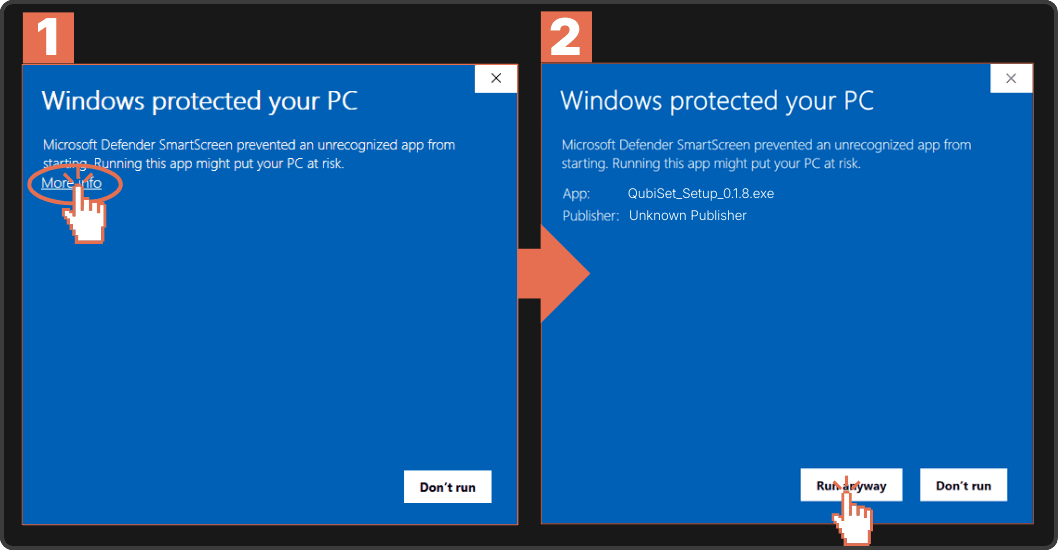
When installing QubiSet on Windows, the Windows Smart-Screen will prevent you from doing so, because the Beta is not yet sigend with an EV-Certificate.
In order to install anyway you need to:
- Click More Info
- Click Run Anyway
Feel free to reach out if you have any other troubles at support@qubicast.com .
Testing with caution
QubiSet is designed with safety as a priority. We never write data to your fixtures without your explicit action. All configuration changes require user confirmation before being applied.
However, we've discovered that certain fixtures can exhibit unexpected behavior even when receiving standard RDM read requests, which are designed to be non-invasive queries used solely for device discovery and status monitoring.
Known Issue: Fixture Reboots from Read Requests
Some lighting fixtures may react unpredictably to RDM read commands, including:
- Unexpected reboots or resets
- Temporary loss of communication
- Brief interruptions in DMX control
This occurs despite QubiSet only requesting information from the device, not modifying any settings. The issue stems from how certain fixture manufacturers have implemented their RDM response handlers, not from QubiSet's communication.
Report Issues Directly in QubiSet
If you encounter fixtures that reboot, disconnect, or behave strangely during device discovery or monitoring, QubiSet makes reporting easy:
Use the in-app Feedback Form
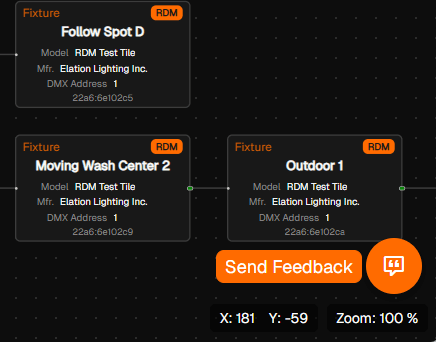
- Open the feedback form in QubiSet (Button at the bottom right)
- Select the affected fixture in the network map
- Select "Fixture Issue" from the feedback type dropdown
- Describe the behavior you observed
- Submit
QubiSet automatically includes all relevant fixture technical data.
Your feedback helps us build workarounds and maintain a compatibility database that benefits the entire lighting community.
Contact support
You can also contact us directly with any questions or issues you might have with QubiSet and we will do our best to get back to you in a timely manner.
Email: support@qubicast.com